At a glance
Expert's Rating
Pros
- 7 decent ports (7-in-1)
- Neo colors (5-in-1)
- Magnetic
- Highly portable
Cons
- Average port speed
Our Verdict
The Satechi OntheGo Multiport Adapter is available in either a black 7-in-1 hub or MacBook Neo-colored 5-in-1 hub. Each offers a decent set of useful ports in an extremely portable form. This, plus the hidden built-in cable and magnetic attachment, make it an attractive option for the regular tech traveler.
Price When Reviewed
This value will show the geolocated pricing text for product undefined
Best Pricing Today
Price When Reviewed
$59.99
Best Prices Today: Satechi OntheGo 7-in-1 Multiport Adapter





As useful as the MacBook’s ports are, there often just aren’t enough of them—especially on the one-data-port MacBook Neo. Attach a USB-C hub to one of your MacBook’s Thunderbolt ports or the Neo’s rear USB-C port to greatly increase functionality and at a low cost.
Design
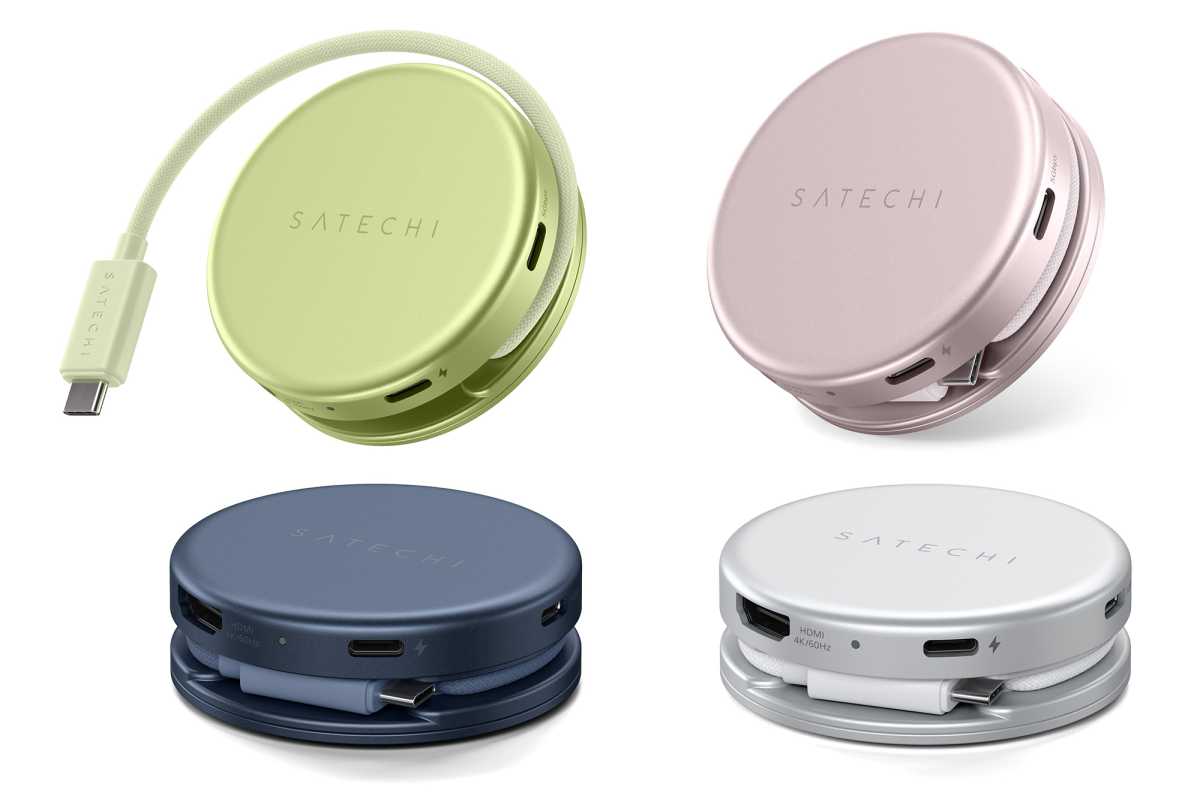
The Satechi OntheGo Multiport Adapter doesn’t look like the average USB-C hub. It’s a pocket-sized hockey puck shape with a coiled braided USB-C cable and seven varied ports, and handily portable.
The black 7-in-1 hub has a 2.55-inch (6.5cm) diameter and sits just over an inch tall (2.7cm). It weighs 2.4oz (68g).
Satechi has released versions of the OntheGo Multiport Adapter in the four colors of the MacBook Neo (Blush, Citrus, Indigo, and Silver) as well as the standard Black. The Neo-colored 5-in-1 hub is a little less tall (0.87 inch, 2.2cm) and weighs a fraction less too at 2.2oz (62g). In real life you won’t notice the difference, but you may miss some of the included ports.
Satechi
Another startling break from hub design is the OnTheGo hub’s magnetic mount that enables you to mount it on the back of your device, be that a MacBook, iPhone or iPad.

Simon Jary
It will clamp to the back of an iPhone via MagSafe, and it comes with a 3M Adhesive Ring (in the same color as the chosen hub) to add compatibility for the iPad, laptops, gaming consoles, and non-MagSafe smartphones or cases. You can slap it onto your laptop and there it will stay even as you move around with the MacBook under your arm. It is possible to remove the ring with some gentle prising, but I doubt you could move it more than a couple of times before it loses its stick, so choose wisely.
Hubs can add clutter to any computing setup with trailing cables and devices sticking out from the hub that’s hanging off the central computer. The OntheGo Multiport Adapter is a much neater solution. Attach the adhesive ring to the back of the laptop’s lid to create a place where you won’t even see the hub while you work.

Simon Jary
Clamped to the back of an iPhone (it must be an iPhone 15 or later to utilize the built-in USB-C cable), the hub gives you access to the SD and microSD card readers (just the SD reader on the 5-in-1) to add extra storage for photos and videos or transferring large files easily between your devices. These affordable portable storage cards are also useful for creating physical backups.
Other members of the Satechi OnTheGo family are available in a gentle Sand or pretty Desert Rose colors. The 7-in-1 is in black only, with the 5-in-1 in either Blush, Citrus, Indigo, or Silver.

Satechi
Specs: plenty of ports
The Satechi OntheGo calls itself a “Multiport Adapter” but it’s really a hub, boasting seven ports, alongside its integrated 10Gbps USB-C cable. None of the ports are pro-level top end but they are capable enough for most users. If the connection was Thunderbolt 5, the card readers UHS-II and the passthrough 140W, the attractive price would sky rocket.
Black 7-Port OnTheGo Multiport Adapter
- Integrated 6.5-inch cable (10Gbps)
- USB-C PD (80W passthrough power)
- 2x USB-A (5Gbps)
- SD Card Reader (UHS-l, 104MBps)
- microSD Card Reader (UHS-l, 104MBps)
- HDMI 2.0 – Up to 4K/60Hz
- Gigabit Ethernet

Satechi
The Neo-flavoured 5-port OnTheGo Hub differs in its ports lineup. Both connect to the Mac with a 10Gbps host cable, but the potential passthrough power to the laptop is a lower 60W on the 5-port compared to 80W on the 7-port. This won’t impact Neo users as the entry-level MacBook can take on a maximum of 30W anyway. Lacking from the 5-port Neo model are the Gigabit Ethernet port, the microSD card reader, and one of the USB-A ports. However, it adds a 5Gbps USB-C data port to replace the one used up by the Hub itself, which is more necessary as there’s just the one data port on the Neo.
Neo 5-Port OnTheGo Multiport Adapter
- Integrated 6.5-inch cable (10Gbps)
- USB-C PD (60W passthrough power)
- 1x USB-C (5Gbps)
- 1x USB-A (5Gbps)
- SD Card Reader (UHS-l, 104MBps)
- HDMI 2.0 – Up to 4K/60Hz
If you’re not using the MacBook’s MagSafe 3 charging cable, you can supply up to 80W of passthrough power (60W on the Neo models) via the USB-C PD port connected to your own USB-C charger. Neo users shouldn’t be concerned at the lesser power as their laptop can accept only 30W power input. Add a 30W or higher wall charger and it will charge faster than with Apple’s 20W charger.
For MacBook Neo and Air users, the HDMI port offers an easy connection point for monitors up to 4K and a 60Hz refresh rate.
The SD card readers are useful for adding portable and very affordable storage. At the time of writing, you could pick up a 512GB microSD card for $40, and 1TB for around $100. The card readers are of the slower UHS-l variety, allowing data-transfer speeds of up to 104MBps. While you can get faster card readers— Apple includes a 250MBps SD card reader on the MacBook Pro, and premium Mac docking stations boast 312MBps UHS-II readers—the ones on the Satechi OntheGo are fine for non-pro work. Note that the 5-in-1 has just the larger SD reader but you can add a simple adapter if you want to use a MicroSD card.
The Gigabit Ethernet (1GbE) is also looking a bit past it these days with docks offering 2.5GbE or faster, but the vast majority of our networks are still stuck at 1GbE so it probably matters little, and even 10GbE networks are backwards compatible with Gigabit Ethernet. The 5-in-1 lacks the Ethernet port.
The dock connects to your device at 10Gbps, so not 40Gbps or 80Gbps Thunderbolt but fast enough for most purposes. Neo users choosing the Satechi USB-C Snap Hub instead, sacrifice both the Neo’s USB-C ports and connect at a slower 5Gbps.
The 5Gbps USB-A port/s (one on the Neo hub and two on the 7-in-1) are handy as no Apple device has sported one of these for years, and yet they persist in memory sticks and some device chargers even in the face of superior USB-C.

Simon Jary
Price
The Satechi OntheGo 7-in-1 Multiport Adapter costs $59.99 / £54.99 / €59,99.
The Satechi OntheGo 5-in-1 Multiport Adapter costs $44.99 / £44.99 / €44,99.
If you need a Thunderbolt or USB4 hub or a hub with more or speedier ports, look at our reviews of the best USB-C and Thunderbolt hubs.

Simon Jary
Should you buy the Satechi OntheGo Multiport Adapter?
The Satechi OntheGo Multiport Adapter offers a decent set of useful ports in an extremely portable form. The ports aren’t at the very top levels of speed and performance but at this price and this compact shape, with the hidden built-in cable and magnetic attachment, it makes a compelling option for the regular tech traveler.
In a world of largely rectangular tech gadgets, there’s something pleasing about a circular accessory. The shape also helps keep the coiled integrated cable tangle-free and the whole package efficiently neat and tidy, and Neo owners will love the matching colors on the 5-in-1 hub.